Introduction
Purpose of the Document
OAuth2 is a system that helps applications securely access a user's data without requiring the user to share their password directly. There are two important flows for the HIN system: the Grant Flow and the Credential Flow.
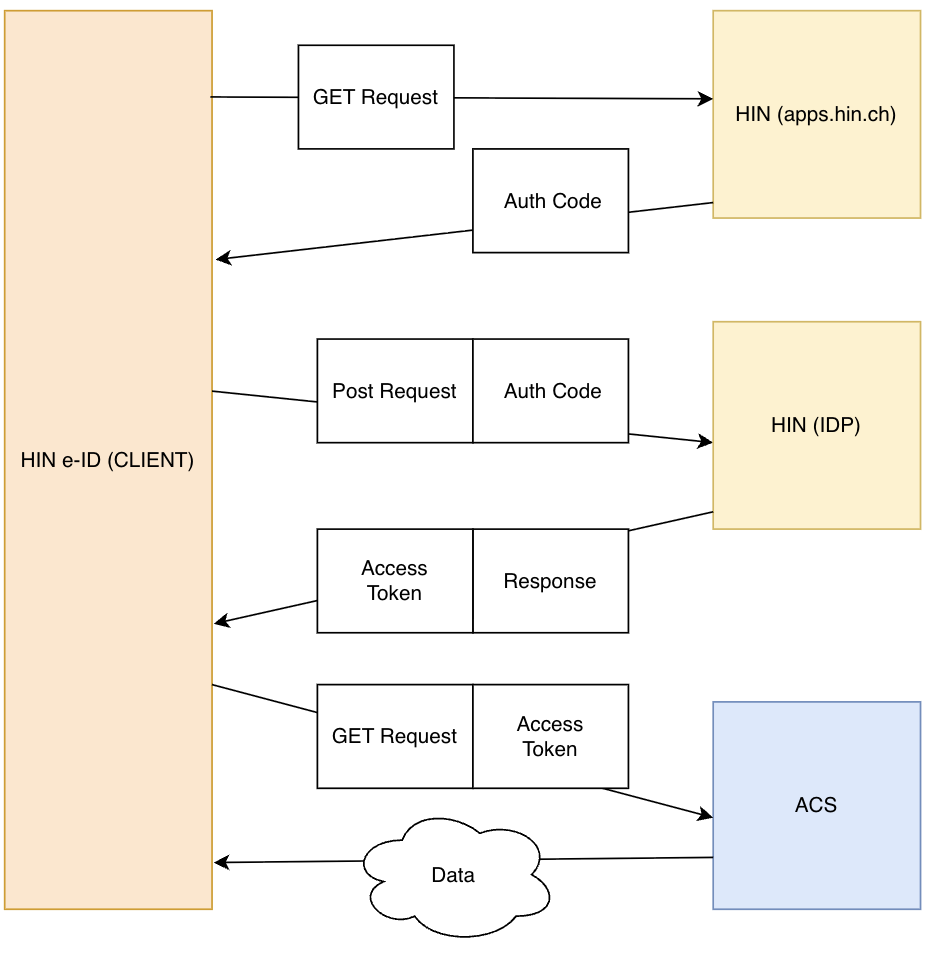
The Grant Flow is used when a user logs in to an application and grants the application access to their data. An example of this is logging in to an application using a Google account, where the application is granted access to the user's emails. The application receives an authorization code, which it then exchanges for an Access Token. This token grants the application permission to access the user's data. For example, we have "Filebox", which is suitable for the Grant Flow. In this case, it is important which user makes the request, as the content of Filebox is different for each user.
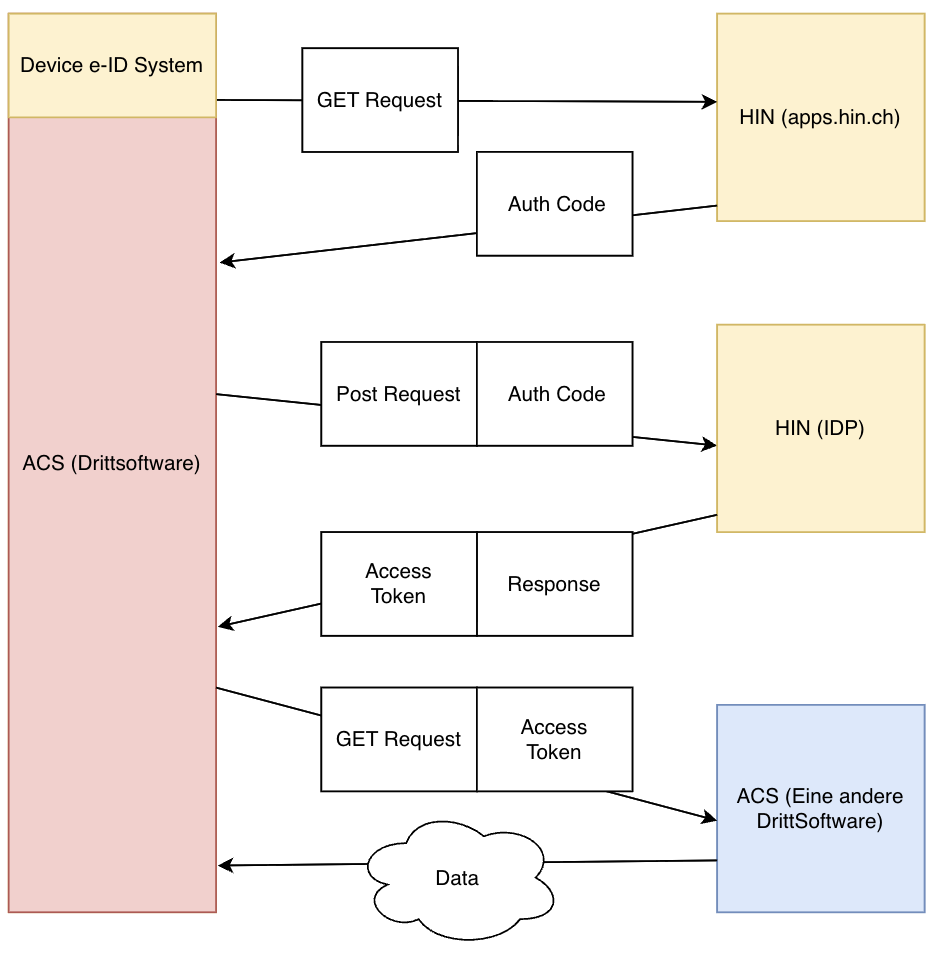
The Credential Flow works differently, as there is no user who needs to consent. The application simply requests an Access Token to access an API or other data. This typically occurs when two applications/machines need to communicate directly with each other without a user being involved in the process. For example, the Covercard service would be correct for the Credential Flow, as it does not matter who the user is.
Specifications
| Type | Time |
|---|---|
| Auth Token | 10 minutes |
| Refresh Token | 2592000s → 30 days |
| API Calls | 1 year |
| Secret (CC) | Max 0.3 per second |
| Secret (GF) | undefined |
OAuth2 Downloads
https://download.hin.ch/acs/oAuth_Vorlage.postman_collection.json.zip
Further Information
You can find additional answers on https://support.hin.ch/.
2.1 Grant Flow
2.1 Credential Flow
3.1 Prerequisites
| Requirements | Authorization Code Flow | Client Credentials Flow |
|---|---|---|
| User Interaction | Yes, the user must log in and grant the application access | No, no user interaction required |
| client_id | Yes, always required to identify the application | Yes, always required to identify the application |
| client_secret | The secret is created by us. We provide it to you. | You must generate it yourself via apps.hin.ch. |
| Authorization Code | Yes, after user login, the application receives an authorization code | No, not used, only initial. |
| Redirect URI | Yes, the URL to which the user is redirected after login with the access code in the URL. | No, not required |
| Access Token | Yes, requested after exchanging the authorization code | Yes, requested directly after requesting client_credentials |
| State | Has no significance, but must be provided. The content is irrelevant. | Has no significance, but must be provided. The content is irrelevant. |
| Grant Type | authorization_code (Authorization Code Flow) | client_credentials (Application access without user) |
| Token Group | Yes, always required. | Yes, always required. |
| Nevis Role | Yes, always required. | Yes, always required. |
| code | Yes, always required. This is the Auth Code. | Yes, always required. This is the Auth Code. |
3.2 Two OAuth2 Flows - Advantages / Disadvantages
Client Credentials Flow
| Advantages | Disadvantages |
|---|---|
| Fast authentication without user interaction | No user access, therefore less control |
| Ideal for automated processes | Insecure if token is compromised |
| Easy to implement for M2M communication | No possibility for individual user authentication |
| No user interaction required | No user consent or rights |
Authorization Code Flow
| Advantages | Disadvantages |
|---|---|
| Allows user to maintain control over access | Requires user interaction, which can slow down the process |
| User consent increases security and trust | May not be suitable for automated processes |
| Flexibility if user access is required later | More complex to implement than Client Credentials Flow |
| Can be adapted for M2M scenarios | User interaction may be unnecessary in some cases |
4.1 Der Auth Token
Einleitung
Bevor auf geschützte Daten oder Funktionen zugegriffen werden kann, muss in beiden Fällen – sowohl im CC Flow als auch im Grant Flow – zunächst ein Auth Token bezogen werden. Der Prozess ist in beiden Fällen ähnlich: Der Auth Token dient als Nachweis dafür, dass der Benutzer oder die Anwendung berechtigt ist, auf die angeforderten Ressourcen zuzugreifen.
Im CC Flow(Nur Variante A) gibt es allerdings nur eine Möglichkeit, den Auth Token zu erhalten, im Gegensatz zum Grant Flow(Variante A oder B), bei dem es zwei Varianten gibt. Nachdem der Auth Token bezogen wurde, kann dieser verwendet werden, um die notwendigen API-Requests auszuführen und den Access Token. Der Hauptunterschied zwischen den beiden Flows liegt darin, wie der Token abgerufen wird, aber in beiden Fällen muss der Token vor dem Zugriff auf die Daten gültig sein.
4.2 Obtaining the Auth Token (OTP)
In the Grant Flow, there are two ways to obtain the Auth Token. For the Credential Flow, only Variant A applies.
Within the validity period, the token must be used in a POST request to obtain the requested data. For the user, this typically means entering the token in a designated field provided by the developers. However, with Variant B, this can also be automated.
4.3 Variant A
Process:
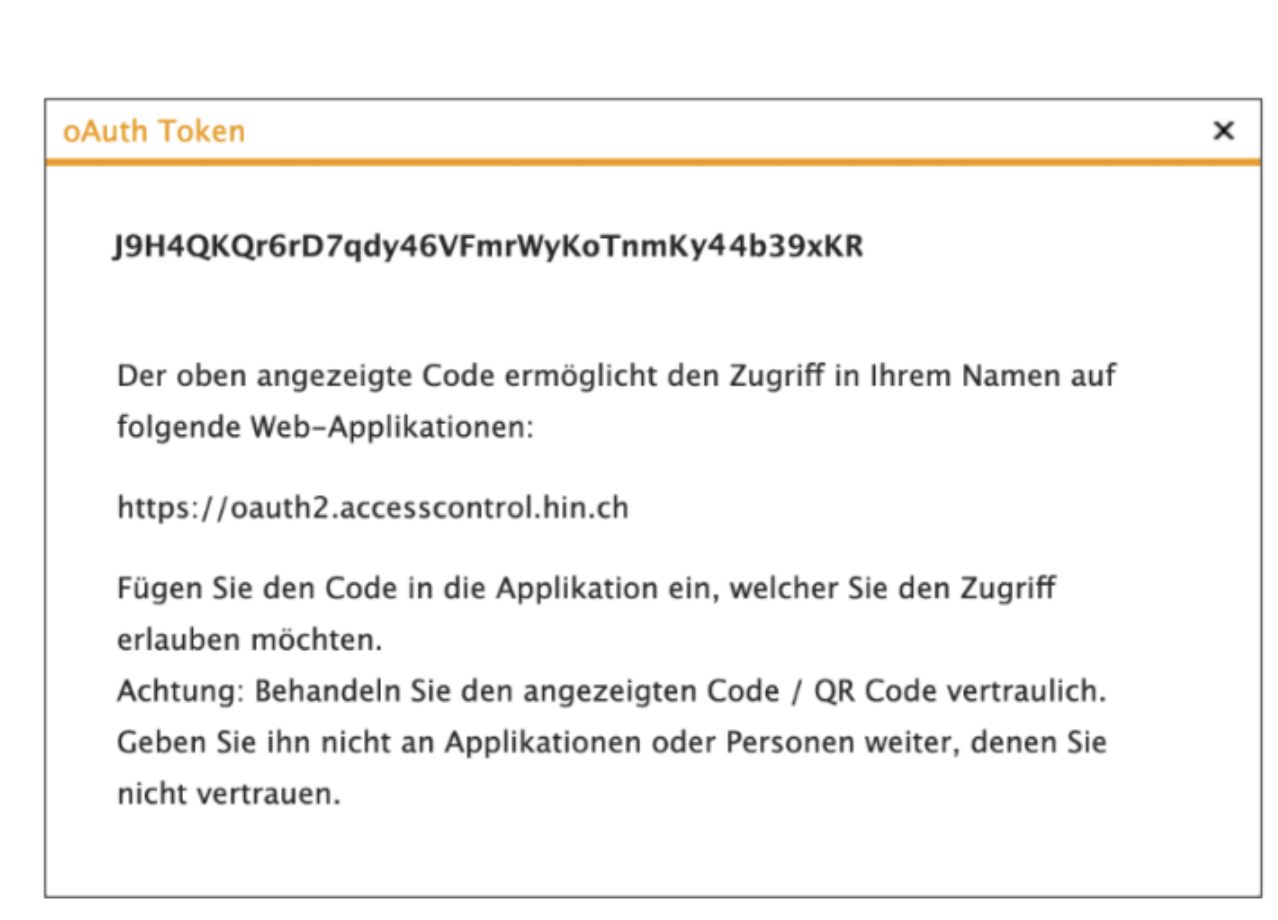
- The user logs in to their account (HIN e-ID) and navigates to apps.hin.ch.
- There, the option for ID delegation is selected, and the corresponding token is chosen.
- The token is copied and displayed. This token is a long string of characters.
- In this variant, the user or technician must retrieve the Auth Token via the web browser. The token is only valid for 10 minutes, similar to a one-time password (OTP).
Link: http://apps.hin.ch/#app=HinCredMgrOAuth;tokenGroup=
4.4 Variant B
Process
- Build a link using HIN parameters.
- The user authenticates via e-ID and receives a popup with Yes and No options.
- Authentication and Redirect: After successful login, the user is redirected to a URL (which must be communicated to HIN) that contains the Auth Token as a URL parameter. For example: https://example.com/callback?Code=iwdjoijwiw90dj9j2odij2oijwoidwd
- Token extraction in the backend: The server receives the request and extracts the Auth Token from the URL. The token is located in the "Code" parameter (e.g., Code=iwdjoijwiw90dj9j2odij2oijwoidwd).
- Obtaining the HIN Access Token.
Build the link: http://apps.hin.ch/REST/v1/OAuth/GetAuthCode/
When opening the link in the browser:
In this variant, the Auth Token is provided directly via a redirect. After a successful login (Yes), there is an automatic redirect to another page, which we need to register in our backend, where the Auth Token is passed as a parameter in the URL. The token could look like this: Code=iwdjoijwiw90dj9j2odij2oijwoidwd.
Backend process:
The server receives this URL and extracts the token from the URL parameter. In this case, it is the "Code" parameter that contains the token iwdjoijwiw90dj9j2odij2oijwoidwd.
Example using Flask
from flask import request

@app.route('/callback')
def callback():
    # Extract the 'code' parameter from the URL
    auth_token = request.args.get('code')

    # Further processing of the token...
5.1 The POST Request
In the context of OAuth 2.0, the POST request refers to the HTTP request that a client sends to the authorization server to obtain an Access Token. After the user has authorized access to their data, the client is provided with an authorization code, which it sends in a POST request along with other required information (such as Client ID, Client Secret, and Redirect URI) to the token endpoint of the server. In response, the client receives an Access Token that grants it access to the user's protected resources.
Example POST Request
[
  {"key": "grant_type", "value": "authorization_code", "type": "text"},
  {"key": "code", "value": "AUTHCODE", "type": "text"},
  {"key": "redirect_uri", "value": "http://localhost", "type": "text"},
  {"key": "client_id", "value": "ch.YourID", "type": "text"},
  {"key": "client_secret", "value": "YourSecret", "type": "text"}
]
POST Request
POST https://oauth2.hin.ch/REST/v1/getoAuthToken
  grant_type=authorization_code&
  code=AUTH_CODE&
  redirect_uri=REDIRECT_URI&
  client_id=CLIENT_ID&
  client_secret=CLIENT_SECRET
6.1 Introduction to Obtaining an Access Token
An Access Token is necessary to access protected data or functions of an application. To obtain this token, the Auth Token must first be sent to the server via a POST request. The Auth Token serves as authentication that the user or application is authorized to obtain an Access Token. After sending the POST request, the server responds with a response that contains the Access Token.
With this Access Token, a GET request can be sent to the desired application or API. In this request, the Access Token is transmitted as proof of access to the protected resources. The application checks the Access Token and, if it is valid, responds with the requested data or information. The Access Token is thus a key that enables secure and authorized access to an application's resources.
It is essential to note that Access Tokens are typically only valid for a limited time, which is why regular renewals may be necessary to continue accessing protected data.
6.2 Obtaining the Client Secret for the Curl Request - CC
When obtaining an Access Token, it must be defined for which token group the token is valid. The Client Secret must be obtained from apps.hin.ch, unlike the Grant Flow, which must be defined by HIN. The Auth Token is obtained in the same way as in Variant A from apps.hin.ch. The tab only appears after an initial incorrect request is sent, i.e., with an incorrect secret.
Obtaining Access Tokens using Curl
The following Curl request can be used to obtain an Access Token:
curl -H 'Content-Type: application/x-www-form-urlencoded' \
  --data-urlencode "grant_type=client_credentials" \
  --data-urlencode "client_id=<CLIENT ID>" \
  --data-urlencode "client_secret=<SECRET>" \
  https://oauth2.hin.ch/REST/v1/OAuth/GetAccessToken/ACS-Application
Response
{
  "access_token": "<ACCESS TOKEN>",
  "expires_in": 2592000,
  "hin_id": "aakeret",
  "refresh_token": "<REFRESH TOKEN>",
  "token_type": "Bearer"
}
6.3 Obtaining the Client Secret for the Curl Request - GF
Obtaining an Access Token with Curl without Redirect (AuthCode apps.hin.ch)
curl -H 'Content-Type: application/x-www-form-urlencoded' \
  -H 'Accept: application/json' \
  --data 'grant_type=authorization_code&redirect_uri=&code=&client_id=&client_secret=' \
  https://oauth2.hin.ch/REST/v1/OAuth/GetAccessToken
Obtaining an Access Token with Curl (AuthCode with Redirect URI)
curl -H 'Content-Type: application/x-www-form-urlencoded' \
  -H 'Accept: application/json' \
  --data 'grant_type=authorization_code&redirect_uri=<REDIRECT_URI>&code=<CODE>&client_id=<CLIENT_ID>&client_secret=<CLIENT_SECRET>' \
  https://oauth2.hin.ch/REST/v1/OAuth/GetAccessToken
Response
{
  "access_token": "RsT5OjbzRn430zqMLgV3Ia",
  "expires_in": 3600,
  "hin_id": "cmuster",
  "token_type": "Bearer"
}
7.1 Accessing HIN Protected Applications with Access Token
Introduction
With an Access Token, a GET request can be sent to an application or API to access protected data. The Access Token is transmitted in the request to ensure that the request comes from an authorized source. Once the application has verified the token, it returns the requested data if the token is valid. The Access Token thus ensures that only authorized users or applications can access protected information.
Accessing with Access Token via Curl
The exact parameters must be specified by the application provider. Here are general guidelines for using an Access Token with Curl:
curl --header 'Authorization: Bearer <Access Token>' https://<oauth2.application.hin.ch>
Example with Covercard
Here is an example using Covercard:
curl --location 'https://oauth2.covercard.hin.ch/covercard/servlet/ch.ofac.ca.covercard.CaValidationHorizontale?type=XML&langue=3&carte=<krankenkassen_karten_nr>&ReturnType=42a' \
  --header 'Authorization: Bearer <covercard_Access Token>'
7.2 Usage
Accessing with Access Token via Curl
The exact parameters must be specified by the application provider. Here are general guidelines:
curl --header 'Authorization: Bearer <Access Token>' https://<oauth2.application.hin.ch>
Example with Covercard
curl --location 'https://oauth2.covercard.hin.ch/covercard/servlet/ch.ofac.ca.covercard.CaValidationHorizontale?type=XML&langue=3&carte=<health insurance card number>&ReturnType=42a' \
  --header 'Authorization: Bearer <covercard_Access Token>'
Refresh Token: Maintaining Access to Applications and Services
Introduction
A Refresh Token is used to maintain access to an application or service without requiring the user to log in repeatedly. After an Access Token has expired, the Refresh Token can be used to obtain a new Access Token without the user having to re-enter their login credentials. This keeps the connection to the application secure and user-friendly without requiring constant new login processes.
Process
After the user has successfully logged in to the application, the client receives an Access Token and a Refresh Token. The Access Token has a limited validity period, while the Refresh Token remains valid for a longer period. When the Access Token expires, the client sends a POST request to the token endpoint of the authorization server. In this request, the client transmits the Refresh Token, Client ID, and Client Secret. The server checks the validity of the Refresh Token and, if everything is correct, issues a new Access Token. This new token can then be used to continue accessing protected resources without the user having to log in again.
Example Code for a Refresh Token in Python
import requests
import time

def get_new_access_token(refresh_token, client_secret):
    url = "https://oauth2.hin.ch/REST/v1/OAuth/GetAccessToken"

    payload = f'grant_type=refresh_token&refresh_token={refresh_token}&client_id=ch.2ndlevel-cc&client_secret={client_secret}'
    headers = {
        'Content-Type': 'application/x-www-form-urlencoded',
        'Cookie': 'ObSSOCookie=/examplee0Sgr3R5FiCiOt+cexample-'
    }

    response = requests.post(url, headers=headers, data=payload)

    print(response.text)

    if response.status_code == 200:
        token_data = response.json()
        new_access_token = token_data['access_token']
        # Optional: Return a new Refresh Token if it exists
        new_refresh_token = token_data.get('refresh_token', refresh_token)
        return new_access_token, new_refresh_token
    else:
        print(f"Error retrieving token: {response.status_code} - {response.text}")
        return None, refresh_token

# Example loop that regularly renews the Access Token
def main():
    refresh_token = 'rteqr4'  # Your initial Refresh Token
    client_secret = 'your_client_secret'  # Your Client Secret

    while True:
        # Code for using the Access Token would go here
        print("Using the Access Token to access resources...")

        # Obtain a new Access Token
        new_access_token, refresh_token = get_new_access_token(refresh_token, client_secret)

        if new_access_token:
            print(f"New Access Token obtained: {new_access_token}")
            # You can continue using the new Access Token here
        else:
            print("Error renewing token. Please check login credentials.")
            break  # Stop the loop if the token could not be renewed

        # Wait time to regularly renew the Access Token
        time.sleep(3600)  # e.g., wait 1 hour before renewing the token again

if __name__ == "__main__":
    main()